Run the whole shopfrom one screen.
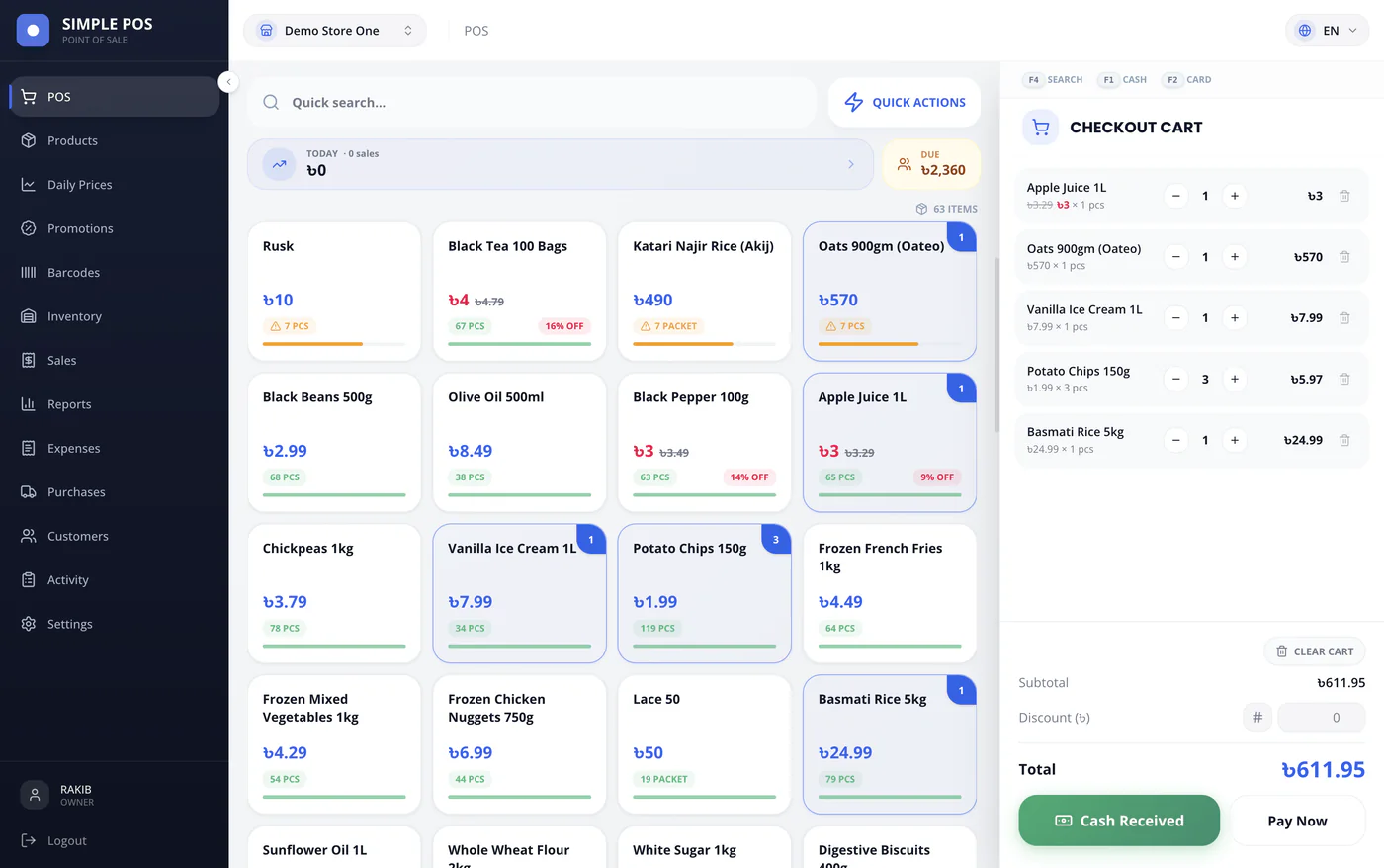
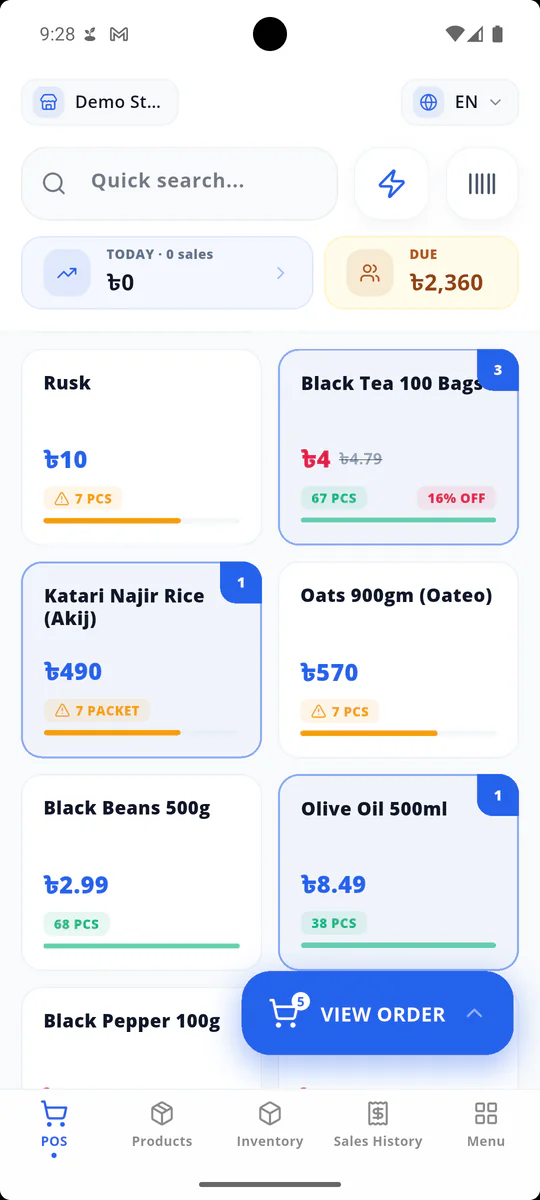
The counter, stockroom, and customer ledger in one simple app—on the web, your phone, or the shop computer. In your language, using your currency.
- Free trial
- Set up in minutes
- Cancel anytime
9 languages
Every screen, button, and report switches from a single menu. Your staff never has to read English.
Web, Android, and desktop
One account across the counter computer, the owner's phone, and the manager's laptop.
Keep selling offline
Sales are written to the device before the network hears about them—in the browser as well as in the apps—and go up the moment you are back online.
Someone to ask, in the app
Open a ticket from any screen and attach a photo of what went wrong. The reply comes back inside the app, not in an email thread.
What you get
Everything a small or medium shop actually needs.
Not a bulky accounting suite with a till bolted on. Just the things a shop does every day, each designed to take seconds.
Sell in seconds
Scan a barcode or tap a product. Keyboard shortcuts, split payments, discounts, and an instant receipt—plus up to three carts held at once, so the customer digging for change never holds up the queue.
Stock that stays accurate
Sales, purchases, returns, and corrections all update your inventory automatically. Every change leaves a record, and you are warned before a shelf runs empty.
A customer ledger you can actually read
See who owes what, record partial payments, and send reminders via WhatsApp. Customer accounts without the messy notebook.
Profit, not just turnover
Daily totals, product-level margins, expenses, and supplier payables—so you know what you actually earned, not just what you took in.
Branches and staff
Add stores, invite your team by email, and give each person only the access their role requires. Owners see everything; cashiers just see the till.
Sell by weight, not just by piece
Rice, sugar, vegetables, cloth. Mark a product as loose and the till takes a weight—or a plain amount of money—instead of a count, with one-tap presets for the sizes you sell all day.
Run an offer without rewriting prices
Put a promo price on any product, with a start and end day if you want one. The till charges it while it is live and goes back to the normal price by itself, on your shop's clock.
Barcodes for the goods that have none
Scan what the supplier already labelled, and print your own stickers for whatever did not come with a code. One product can hold several barcodes, so two suppliers' boxes ring up as the same item.
Close the day with confidence
Count the drawer against the system's expected total, record any differences, and lock the day. Tomorrow starts clean.
Getting started
Three steps, and you are selling.
No installations, no consultants, and no data migration headaches.
- 1
Create your shop
Name it and pick your country. The app automatically sets your currency, payment methods, and business hours.
- 2
Add your products
Type them in or scan existing barcodes. Price, cost, and stock all live on one simple row.
- 3
Open the till
Start selling on any device you already own. Stock, ledgers, and reports update automatically in the background.
Live demo
Walk into a shop that is already trading.
Not a video, and not a tour of screenshots. The demo is the whole app running inside your own browser, opened on a shop with a month of sales, stock, and customers already behind the counter.
- No account and no card. The shop is open by the time the page has finished loading.
- Every figure in it was rung up by the app itself. Sell something and watch the reports move.
- Switch the language inside it and the whole shop follows—country, currency, and payment methods.
Opens in a new tab. Nothing you do in there is saved, and none of it touches a real shop.
Offline first
The internet goes down. The shop does not.
Every till here keeps its own copy of your products and records a sale on the device before the network hears about it—the Android and desktop apps, and the browser too. Anything taken while you were offline waits in a queue you can see, and goes up the moment the connection returns.
- Queued sales are visible in a list, never hidden
- Every record reaches the server exactly once, regardless of retries
- Barcode scanning uses your device's own camera, so it needs no connection either
- Sale recordedWaiting to sync
- Sale recordedWaiting to sync
- Sale recordedWaiting to sync
Your country, out of the box
Local by default, no configuration needed.
Choose your country when you sign up, and the app already knows how your currency is formatted, which payment methods your customers use, and your business operating hours.
- Your country's tax ready to switch on, at the rate and in the way your shelves price it
- Only the payment methods that exist where you trade
- Your day starts and ends on your shop's local time, not a server's
Set up for you
- Currency
- $ USD
- Tax
- Sales Taxyou set the rate
- Shop clock
- 01:40 PMAmerica/New_York
Payment methods
- Cash
- Card
- Apple Pay
- Contactless
With 20 countries already built into the app, a new shop starts out fully configured and ready to go.
Countries already set up in the app
- Bangladesh
- India
- Pakistan
- Nepal
- Singapore
- United Arab Emirates
- Saudi Arabia
- Qatar
- Kuwait
- Oman
- Bahrain
- United Kingdom
- United States
- Canada
- Australia
- New Zealand
- Ireland
- Spain
- Italy
- Portugal
Pricing
One price for the whole shop.
Every plan includes the register, credit ledger, stock management, expenses, reports, and day-close. The only difference is the number of stores, products, and staff you can have.
If a subscription ever lapses, you are never locked out of your own records. Sales history, customer balances, and reports stay readable—only new entries require an active plan.
Downloads
Get it on the screen you actually use.
The phone and desktop apps hold the shop's whole day on the device—the fastest till at the counter, and the one that does not depend on a browser keeping your data.
iOS
iPhone and iPad, on the same account.
Coming with the first release
Windows
For the counter PC.
Coming with the first release
macOS
For Apple silicon and Intel Macs.
Coming with the first release
Or just open it in a browser
Nothing to install and nothing to update, and it keeps selling through a dropped connection too. Install the app when you want the day kept somewhere a cleared browser cannot reach.
Every one of these records sales offline and syncs the moment your network comes back—the browser included.
Multilingual
Nobody should have to work in a second language.
Pick a language and the entire app adapts—navigation, forms, reports, and receipts. Each team member's choice is remembered on their own device.
Try it. This page changes with it.
Questions
Before you sign up.
The questions shopkeepers ask us most.
Can I see it before I sign up?
Yes. There is a live demo at demo.simple-pos.net — the full app running inside your own browser, opened on a shop with a month of trading behind it. Sell something, take a payment, read the reports. No account is needed, and nothing you do there is saved.
Do I need to install anything?
No. Simple POS runs in any modern browser, so your counter computer only needs a login — and the browser till keeps taking sales when the connection drops, exactly like the apps do. Install the Android or desktop app when you want the shop's day held on the device itself.
Can I keep customer credit in it?
Yes. Every customer has a running balance: sell on credit at the till, record part-payments as they come in, and send a reminder on WhatsApp. The same khata your notebook keeps, with the arithmetic done for you.
Can my staff use it at the same time?
Yes. Invite your team and assign each person one or more roles—cashier, stock manager, admin. Everyone works on the same live data, and each person only sees what their role allows.
What happens to my data if I stop paying?
You keep full read access. A lapsed account is never locked out of its own records—sales history, customer balances, and reports stay open. You only need an active plan to make new entries.
Does it handle more than one shop?
Yes. Add each branch as a store and switch between them from the top bar. Stock, staff, and reports stay separate for each location.
Is it free?
There is a free trial, and you do not need a card to create your shop. It is not free forever—Simple POS is paid for by the shops that use it. Every plan and price is shown inside the app before you pay for anything.
How do I start?
Create your shop, add a few products, and make a sale. You'll start on a free trial, and you can review all pricing plans inside the app before paying for anything.
Your counter deserves better than a notebook.
Create your shop now and make your first sale on the screen you are reading this on.